Project Management Plan
Table of Contents
Identification
Document Overview
This document outlines the manner in which the project will be planned and executed. It describes the project’s development process. It contains additional information on development tools used.
Abbreviations and Glossary
- HMSC
Hierarchical Modelling of Species Communities software name.
- CSC
Finnish IT Center for Science primary stakeholder.
References
Document ID |
Document Title |
URL |
|---|---|---|
[hmsc] |
Ovaskainen, O. et al. 2017. How to make more out of community data? A conceptual framework and its implementation as models and software. Ecology Letters 20, 561-576. |
|
[pep8] |
PEP 8 – Style Guide for Python Code |
|
[tpope] |
A Note About Git Commit Messages |
http://tbaggery.com/2008/04/19/a- note-about-git-commit-messages.html |
[cct] |
Cookiecutter: Better Project Templates |
https://cookiecutter.readthedocs.io /en/stable/ |
[nbdiff] |
Welcome to NBDiff’s Documentation! |
https://nbdiff-docs.readthedocs.io/ en/latest/index.html |
Project Management
Team and Responsibilities
Two members make up the HMSC team. We mutually share most analysis, development, and testing tasks. Their responsibilities are listed in detail below.
In addition to the project team, we have a project supervisor, Dr Otso Ovaskainen. He is the one of the PI of project funded by the HORIZON-INFRA-2021-TECH-01 titled, “Biodiversity Digital Twin for Advanced Modelling, Simulation and Prediction Capabilities.”
Title |
Name |
Responsibilities |
|---|---|---|
Team Member |
Gleb Tikhonov |
Software Development, Documentation, Testing |
Team Member |
Anis U Rahman |
Software Development, Documentation, Testing |
Work Breakdown Structure, Tasks and Planning
Work Breakdown Structure and Task Estimation
# |
Work |
Estimated effort (hrs) |
1. |
PROJECT MANAGEMENT PLAN |
65 |
1.1. |
Software Requirements Specification |
25 |
1.2. |
Data Gathering |
30 |
1.2.1. |
Research existing joint species distribution modeling |
10 |
1.2.2. |
Research end-to-end machine learning |
10 |
1.2.3. |
Research high-performance computing for machine learning |
10 |
1.3. |
Interview End-users |
5 |
1.4. |
Research Similar Solutions/Attempts |
5 |
2. |
DESIGN |
25 |
2.1. |
Software Architecture Design |
15 |
2.1.1. |
Design modules for data loading/preparation/segregation |
5 |
2.1.2. |
Design modules for model structure and fit |
5 |
2.1.3. |
Design modeles for model evaluation |
5 |
2.2. |
Program Interface Design |
10 |
2.2.1. |
Create program configuration design |
5 |
2.2.2. |
Design program’s command line interface (CLI) |
5 |
3. |
PROTOTYPE |
20 |
3.1. |
Design prototype version of algorithm |
5 |
3.2. |
Design CLI for prototype |
5 |
3.3. |
Design tests for prototype |
5 |
3.4. |
Implement prototype version |
5 |
4. |
SOFTWARE DEVELOPMENT |
|
4.1. |
Development |
220 |
4.1.1. |
Implement data loader |
20 |
4.1.2. |
Implement base model |
100 |
4.1.3. |
Implement model trainer |
100 |
5. |
TESTING AND QUALITY ASSURANCE |
25 |
5.1. |
Test Plan |
5 |
5.2. |
Unit Testing |
15 |
5.2.1. |
Implement tests for loader |
5 |
5.2.2. |
Implement tests for trainer |
5 |
5.2.3. |
Implement tests for predictor |
5 |
5.3. |
Program CLI Testing |
5 |
6. |
INTEGRATION |
|
6.1. |
Integration Testing |
5 |
7. |
DEPLOYMENT/ROLLOUT |
50 |
7.1. |
Define Configuration and Readme Files |
5 |
7.2. |
Define Online Help |
30 |
7.2.1. |
Documentation for hmsc.readthedocs.org |
20 |
7.3. |
Installation and User Guide |
5 |
7.3.1. |
Document installation instructions |
5 |
7.3.2. |
Document user guide |
5 |
7.4. |
Maintain and Update Documentation |
15 |
8. |
PROJECT PLANNING |
25 |
8.1. |
Team Meetings |
20 |
8.2. |
Stakeholder Meetings |
5 |
Relationships with project stakeholders
End-User Involvement
As our project will be an open source project, many end-users will choose to give feedback on the GitHub issue tracker and mailing list, before and after releases.
Communication
Meetings
Initial meeting: We will meet with our PI and discuss project requirements and goals.
Weekly meeting: We will discuss the project’s progress bi-weekly with our team members in a remote meeting. We will discuss the features in progress; our progress towards the next release/prototype, and review feedback from interested project repository watchers.
Post-release meeting: We will discuss a release of the software after it is published.
Reviews
Code Review: Code review will be done on every pull request (i.e., code change).
At least one team member other than the author will review the
code change.
The reviewer(s) will annotate the code with their comments.
The developer will revise their pull request to satisfy the reviewer.
The reviewer will merge the code change into the main repository.
Design Review: New features will be discussed in the GitHub issue tracker. Feedback will be solicited from interested watchers.
Release Candidates (RCs): before each release, a release candidate version will be provided to the supervisor and interested end-users for review. This will provoke feedback of various kinds.
Training
We started training before project initiation to learn both the pythonic way of coding, end-to-end machine learning frameworks, and linear algebra libraries. Before implementing a feature, we would have meetings to review the topics that had been covered in the trainings and discuss available choices for its implementation. We intend to continue this training throughout the project development phase to produce high quality code and proficient software.
System Requirements and Project Input Data
Configuration Management
Software Configuration Management
We will use Git for software configuration management. Each change to the software will be captured in a commit on the developer’s computer. These changes will then be uploaded to GitHub for review and merging into the master branch.
Each commit contains a description of the change. We will follow the recommendations found on Tim Pope’s blog post on the subject ‘[tpope] <http://tbaggery.com/2008/04/19/a-note-about-git-commit-messages.html>’__ and enforce the rules during code review.
Documentation Configuration Management
We will use Git and GitHub (https://github.com/tarmstrong/nbdiff-docs) to track our documents as we produce and receive them. This will also track changes to the documents.
Software Development Management
Software Development Process
Our development process will be based on an mixed development approach. The approach combines both the vertical and the horizontal approaches. The idea is to divide the project into features (vertical). Then each feature is divided into layers (horizontal) and attempted in an iterative and incremental manner. The rationale for this choice is:
to focus on important features in the project.
to continuous perform unit and integration tests, this makes the outcomes predictable.
to regularly gather feedback to adjust requirements and design.
We have split the project into three major milestones spaced 5 weeks apart. These will have equal portions of work with a release comprising a functioning feature of the software and a release of updated documents to the supervisor.
Milestone |
Milestone Date |
|---|---|
M1 |
2012-09-19 |
M2 |
2012-10-24 |
M3 |
2012-11-28 |
Software Development Tools
The following is a list of the main tools we will use while developing this project. We will add tools to this document as we discover which are effective for our process.
Git: Git is a distributed version control system for source code.
GitHub: is a hosting service for Git that provides a web-based interface to various Git features, and includes issue trackers and release hosting.
Python: is the programming language compatible with the TensorFlow framework, we will adopt it to program our software.
PyTests: is a unit testing tool for Python.
PyFlakes: is a tool for automatically checking our Python code against the PEP-8 standard [pep8].
Mock: is a library for mocking objects in unit tests for Python.
Black: is an uncompromising Python code formatter.
TensorFlow: is a free and open-source software library for machine learning and artificial intelligence.
tf.linalg: is a TensorFlow library with operations for linear algebra.
Scipy: is a free and open-source Python library used for scientific computing and technical computing.
Documentation:
Sphinx: is a widely-used documentation system for Python. This will be useful for source code documentation and the manually written documentation (including installation instructions, tutorials, etc.)
TravisCI (https://travis-ci.org/): is a free, online continuous integration service that runs automated tests, checks code coverage, and checks code quality every time a patch is submitted to a project. This will be used to provide automatic verification of pull requests to aid reviewers.
Software Development Rules and Standards
For our source code (both functional code and test code), we will adhere to the following standards. Where possible, we will use a tool to automatically verify that our code adheres to the standard. We will also verify this through our code reviews.
Coding standard for Python: PEP-8 [pep8] automated using Black
Static code analysis using PyFlakes: https://pypi.python.org/pypi/pyflakes
For architectural documentation, we will use the Unified Modeling Language (UML).
Project architecture
The software domain involves a series of functional components including data loading/preparation and modelling. The following use cases can be identified in general, namely
Collect/load/prepare data
View/use fitted model
Fit/Evaluate a model
The resulting use case diagram for the systems is,
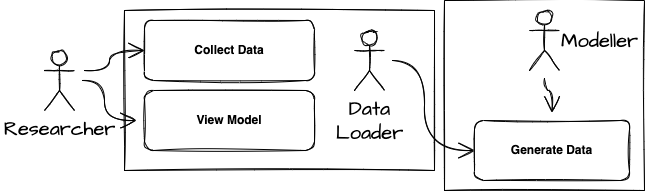
We present a two-layered view of the system: data and bussiness layer. The layered view can be deployed on a single machine with a graphics co-processor. The data is available locally on the machine with the program invoked using a command-line interface. The data layer prepares the program and loads the data, followed by fitting and evaluating a model.

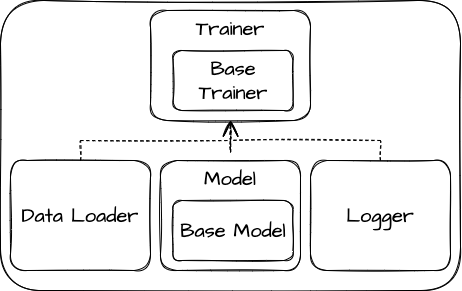
The high-level logical view of the system captures the functionality provided to its end-users, and it illustrates the collaborations among the system components.
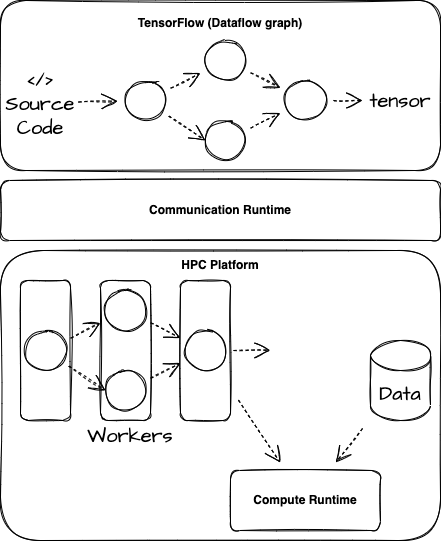
The high-level deployment view of the software demonstrates that the python source code is compatible for transformation into datagraphs for execution on co-processors located remotely in the form of high-performance computing platform.
Mapping existing R codebase
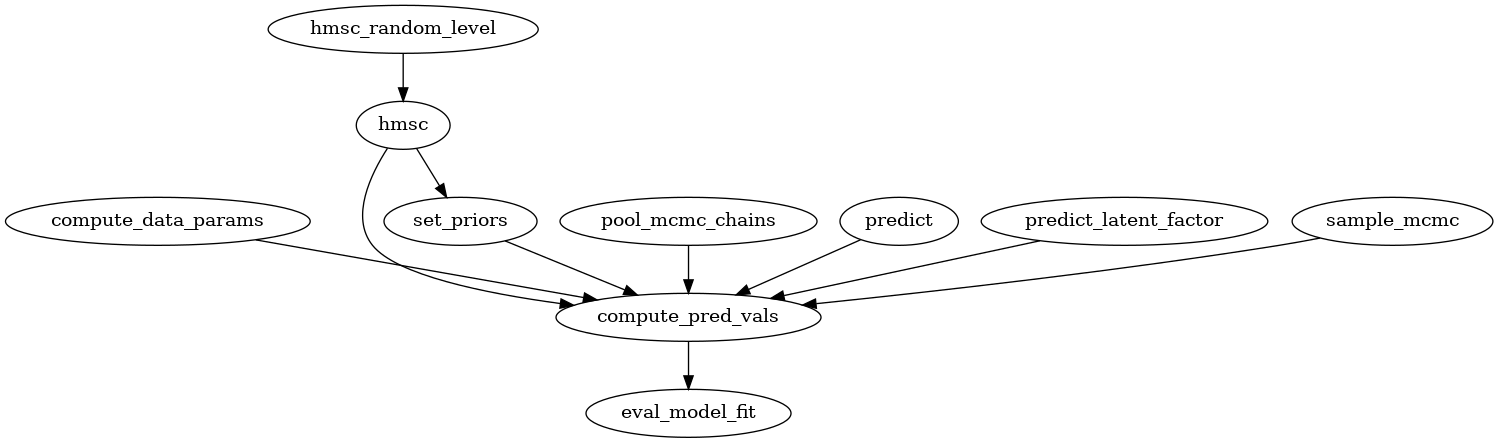
For reference the existing codebase in R has two main functions: sample_mcmc() and compute_predicted_values(). Below is the callgraph for sample_mcmc().
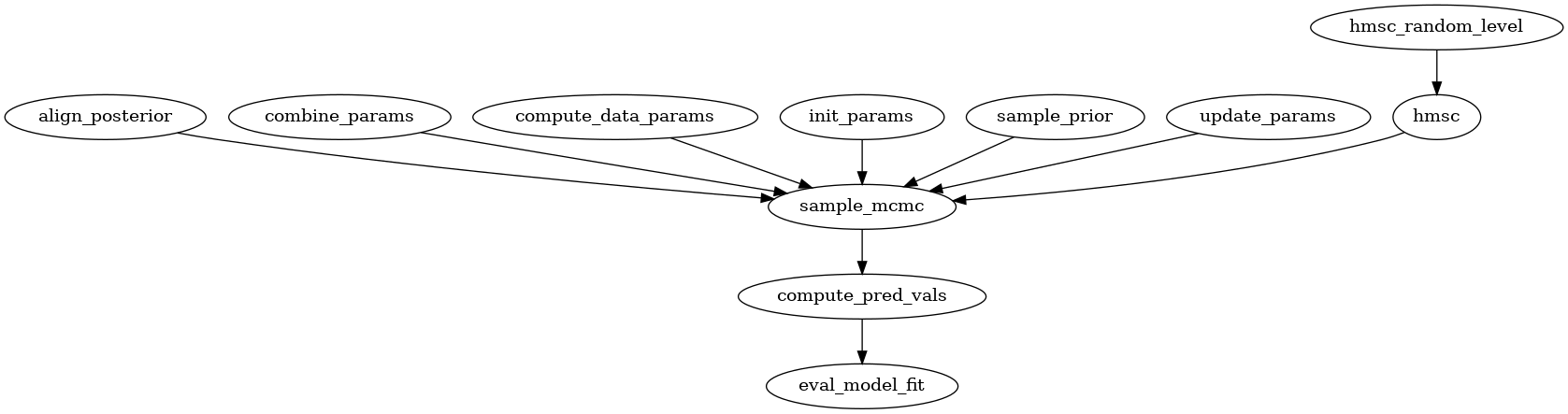
Likewise, the callgraph for compute_predicted_values() (renamed as compute_pred_vals()) is illustrated below. We plan to map these functions into the suitable component within the logical view presented earlier.
Folder structure
The directory structure of your new project looks like this:
├── LICENSE
├── Makefile           <- Makefile with commands like `make data` or `make train`
├── README.md          <- The top-level README for developers using this project.
├── data
│   ├── external       <- Data from third party sources.
│   ├── interim        <- Intermediate data that has been transformed.
│   ├── processed      <- The final, canonical data sets for modeling.
│   └── raw            <- The original, immutable data dump.
│
├── docs               <- A default Sphinx project; see sphinx-doc.org for details
│
├── models             <- Trained and serialized models, model predictions, or model summaries
│
├── notebooks          <- Jupyter notebooks. Naming convention is a number (for ordering),
│                         the creator's initials, and a short `-` delimited description, e.g.
│                         `1.0-jqp-initial-data-exploration`.
│
├── references         <- Data dictionaries, manuals, and all other explanatory materials.
│
├── reports            <- Generated analysis as HTML, PDF, LaTeX, etc.
│   └── figures        <- Generated graphics and figures to be used in reporting
│
├── requirements.txt   <- The requirements file for reproducing the analysis environment, e.g.
│                         generated with `pip freeze > requirements.txt`
│
├── setup.py           <- Make this project pip installable with `pip install -e`
├── src                <- Source code for use in this project.
│   ├── __init__.py    <- Makes src a Python module
│   │
│   ├── data           <- Scripts to download or generate data
│   │   └── make_dataset.py
│   │
│   ├── features       <- Scripts to turn raw data into features for modeling
│   │   └── build_features.py
│   │
│   ├── models         <- Scripts to train models and then use trained models to make
│   │   │                 predictions
│   │   ├── predict_model.py
│   │   └── train_model.py
│   │
│   └── visualization  <- Scripts to create exploratory and results oriented visualizations
│       └── visualize.py
│
└── tox.ini            <- tox file with settings for running tox; see tox.readthedocs.io
Test Phases Management
Unit tests
PyTest is a framework to improve testing productivity. The test are written in Python language, they are easy and scalable.
Feature Tests
One or multiple unit tests can be used to test the functionality of a component.
Integration Tests
To test multiple components of the software or to perform end-to-end testing to ensure that the software is working.
Performance Tests
We will perform performance tests to measure the efficiency of a piece of code. The size of the code may range from a single method to the whole software.
Problem Resolution
We will use GitHub’s issue tracking to handle all feature requests, change requests, inquiries, questions as well as to report bugs. Using GitHub’s tracking feature, issues will be opened when a matter is raised. GitHub allows us to create custom categories to easily classify our issues. This will allow us to filter through the different requests, inquiries and/or bugs. We will also be able to assign issues to different individuals based on who is more qualified to handle the given issue. Comments can be left on issues, allowing for discussion and problem solving among other team members, as well as status updates on the given issue. Finally, once an issue is resolved, the issue can be closed, allowing us to easily track which issues remain.